AI Connector: What Agents Can and Cannot Do
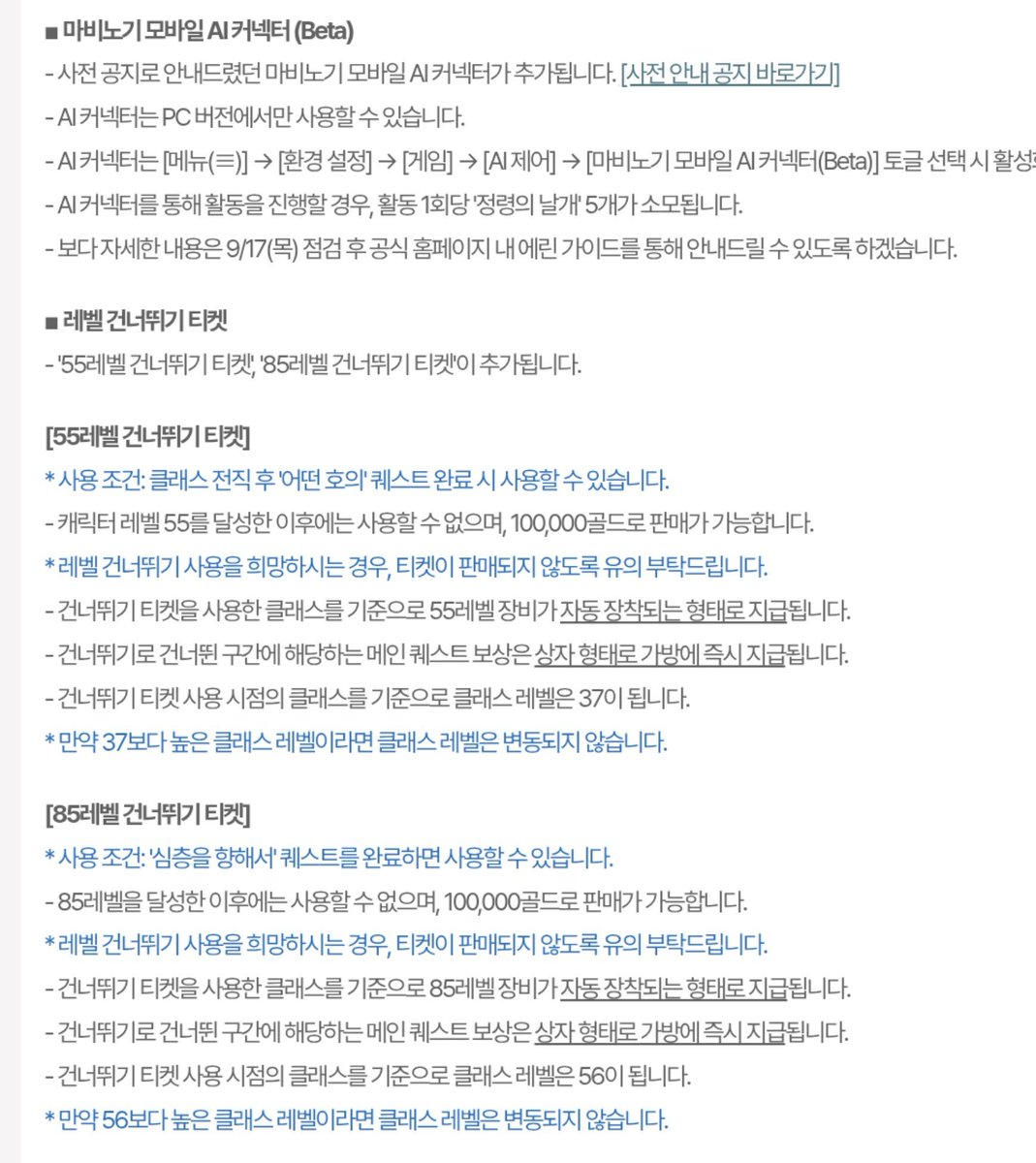
The connector is Ask plus Delegate on the Windows PC beta - your own agent (Claude Code, Cursor, Gemini CLI, Windsurf, Kiro, OpenCode, and reports of Codex). You pay the model vendor; movement for delegated jobs spends Wings of the Spirit.
Core goal: hand off life-skill busywork (gather, process, craft, check bags and dailies) without giving an outside model combat, trading, cash shop, or other players' identities. Treat the agent as a logged-in life-skill clicker with a one-hour leash, not a second account.
1Setup in Order
- 1Confirm you are on the Windows PC client.
The beta is PC only. Mac fails because that client is the iPhone app path. Do not burn API credits until you are on the Windows client.
- 2Install one supported agent on the same PC.
Claude Code, Cursor, Gemini CLI, Windsurf, Kiro, or OpenCode - players also report Codex working. You pay that tool's tokens; Nexon does not give you a model.
- 3Log into the game yourself.
The agent cannot log you in. Stay logged in the whole time it runs.
- 4Turn the connector on.
Settings → Game → AI Connector. Default is off. The client scans for installed tools and registers them. You can disconnect anytime.
- 5Use Ask first - cheap, no Wings.
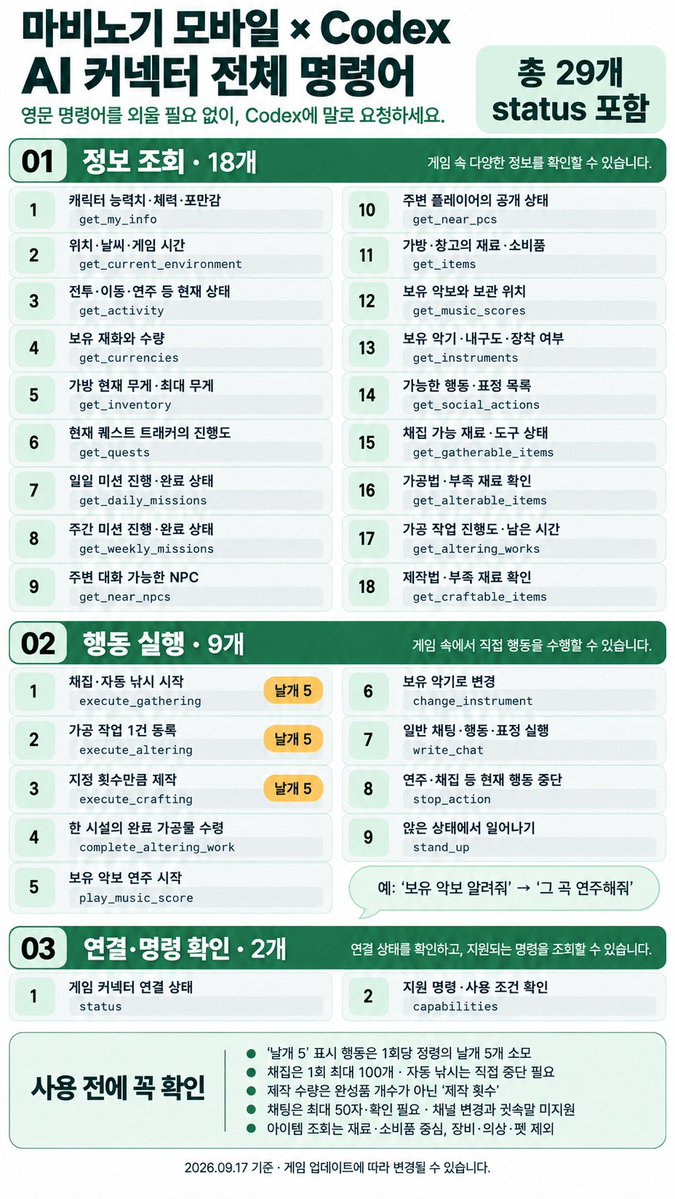
Natural-language reads: stats, location, weather and in-game time, currency, inventory weight, quests and daily/weekly missions, nearby NPCs and the presence (not names) of nearby players, materials on hand, sheet music and instruments.
- 6Delegate only bounded life tasks.
One concrete quantity plus one action: "gather 20 wool," mine N ore, craft N bars, move to a facility and craft, check processing progress, pick up finished items, change song or instrument, stand up, stop.
- 7Babysit the hourly prompt.
Continuous delegate pops a confirmation every hour. If you AFK past it, the agent stops. Plan to be at the PC or accept a hard stop.
- 8Chat drafts need your approval.
The agent does not send by itself. Sent lines show an AI icon on the name - use that if you care about looking like a bot in town.
What Agents Can Do
| Type | Allowed |
|---|---|
| Ask | Stats, position, weather/time, money, weight, quests, dailies and weeklies, nearby NPCs, nearby-player presence, materials, music and instruments |
| Delegate | Gather to a target count, process, travel to craft facilities, craft, check process, take finished items, play or change music, stand up, stop |
| Chat | Draft general chat only after you approve; marked as AI |
What Agents Cannot Do
Do not prompt for these - the connector is built to refuse them.
- Marketplace list or buy.
- Payments and the cash shop.
- Combat or character-growth auto-play. That is the hard line against a play-the-game-for-you tool.
- Guild kick, appoint, or manage.
- One-to-one DMs.
- Discard or dismantle items.
- Logging in for you.
- Piping data to Discord or other messengers.
- Other players' character names, guild names, or chat logs - withheld on purpose.
Key Decisions
| Decision | What to do |
|---|---|
| Ask vs Delegate | Menu-diving and "what do I still need?" use Ask - no Wings. Repeatable gather/process/craft use Delegate, only if Wings plus token cost beats doing it by hand. Some testers found hands faster for small jobs. |
| Which agent | Pick whatever you already pay for among the supported list. The game's allow-list is the limit, not the model choice. |
| Leave it running overnight? | No. Hourly confirm plus must stay logged in - this is not a classic idle bot. |
| Combat or leveling while you sleep? | No. Growth-related auto-play is explicitly out. |
Common Mistakes to Avoid
- Expecting phone or Mac to work in this beta.
- Thinking Nexon hosts the model. They do not - an unpaid API means a dead agent.
- Open-ended "go play" prompts instead of "gather 20 X."
- AFK through the hourly confirm.
- Burning Wings on a job you can click faster yourself.
- Asking it to trade, vendor-dump, or level.
- Assuming chat is silent. Approved AI chat is labeled.
- Leaving the connector on when you do not need it - toggle it off in Settings → Game.
Reference Images